Your phone rings for weekly mowing while the patio projects go to somebody else. A site that talks about everything pulls in everything, and it's mostly small jobs. Build pages for design, hardscape, patios, walls and lighting in each town, add real project pages with your actual yards, publish in winter and track which search became a signed patio.
 0:49Watch the videoRank for the Patio, Not the Mowing: SEO for Landscapers
Why mowing calls take over
You do design and build. Patios, walls, outdoor living. That's the work you want and the work that pays.
But your website has a page that says "landscaping services" and lists everything. Lawn care. Cleanups. Mulch. Mowing. Design. Hardscape. Google reads it and figures you're a general landscaper. When a homeowner searches for weekly mowing, you're a fine match. When someone searches for a patio, you're one of many sites that mention it in passing.
The result is a phone full of small, frequent jobs. That's not a failure. It's a sign the site is telling Google something other than what you want to be known for.
Build pages for the work you want
If you want patio projects, build pages about patio projects. Be specific.
- Design. What your design process looks like, from first sketch to final plan.
- Hardscape. Pavers, stone, walkways and what's involved.
- Patios. Materials, sizes, styles and what changes the cost.
- Walls. Retaining walls, seat walls and when you'd use each.
- Lighting. What it adds and how it's planned into a project.
Then take it a step further. Build those pages for each town you serve. "Patio design and installation in [Town]" is a clearer signal than "hardscaping."
Write each page for real. Describe what you do, what affects the result and what the next step is. Don't copy one page and swap the town name.
Use real projects, not stock photos
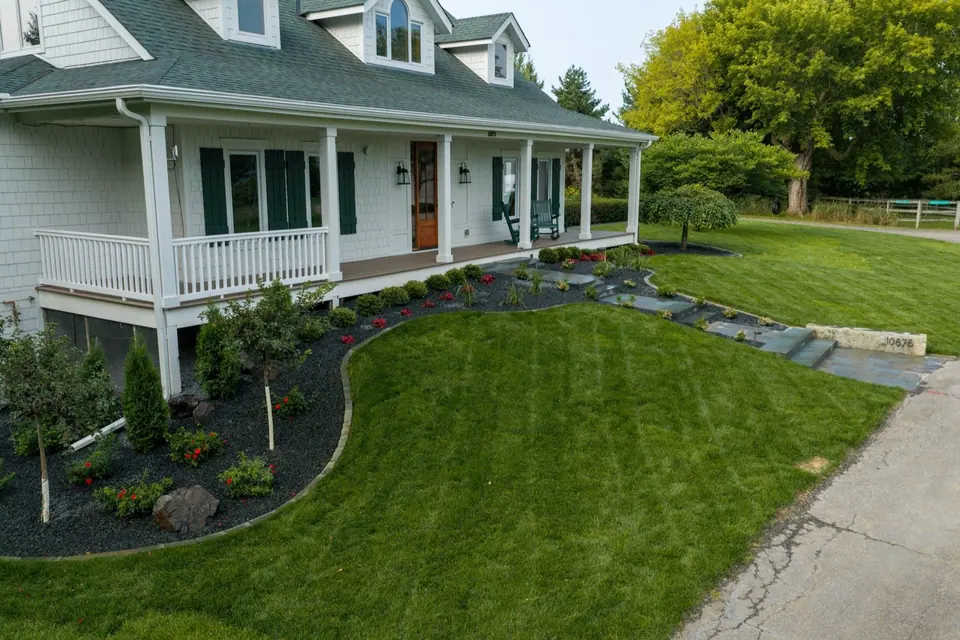
Stock photos don't sell a patio. Buyers want to see your yards. Real finished work answers their biggest question, which is whether you can actually build what they're imagining.
Build real project pages.
- A few before, during and after photos from the same job
- A short description of what the homeowner wanted and what you built
- The town
- A review if you have one, in the customer's own words
Get the homeowner's OK before you publish. Every finished yard becomes another page that nobody else has.
Publish in winter
Homeowners plan in winter and want to break ground in spring. If your pages go up in spring, you're already behind. Pages need time to get noticed and start ranking.
So treat winter as publishing season. Build the town pages, write the project pages, fix the photos. By the time people are ready to call, your pages are there.
I can't promise how fast any page will rank. It depends on competition and many other things. But waiting until the busy season gives you the least chance.
Track which search became a signed patio
A call about mowing and a call about a patio are not the same. Tag each lead by source and by the kind of job. Follow the patio leads all the way to a signed project.
Over time you'll see which pages and searches bring signed patios. Build more of those. If a page brings lots of mowing calls and no patios, rethink it.
A worked example
Say you're a design-build landscaper in a few towns. Your site has one services page that mentions everything. Your calls skew to lawn care.
In winter, you build new pages. One for patio design and installation in your main town, and one for each of two other towns. A page for walls and a page for lighting. You add three project pages from yards you finished last year, each with before, during and after photos and a short description, with permission.
You link the project pages to the patio and town pages. You set up tracking so each lead is tagged by search source and job type.
In spring, you see which pages brought in patio calls and which brought in mowing. You decide where to build next.
What goes on a good patio page
A patio page can be simple and still do a lot of work. Open with a plain answer about what you design and build and where. Then walk through the choices a homeowner faces, like pavers or natural stone, size and shape, how the base is built and how drainage is handled. Say what your process looks like from the first visit to the finished patio.
Add a short section for the town. Mention the kinds of yards you see there, like slopes, shade or small lots, and how you handle them. Finish with one clear next step, such as booking a design visit.
Link each patio page to the matching walls, lighting and design pages, because most patio projects grow into outdoor living. That helps a visitor find the rest of what you do, and it shows Google how your pages connect.
Keep the mowing page, but give it its place
You don't have to delete anything. Lawn care is a fine business and plenty of owners want it as steady income between projects. Keep a clear page for it. Just don't let it be the front door of the whole site.
On your home page, lead with design and build. Show finished yards first. Send the mowing customer to their own page, where they'll find what they need without crowding out the work you want to be known for.
The mistake to avoid
The mistake is trying to be everything on one page. A general site attracts general jobs.
The second mistake is hiding your best work. If your finished yards live in a gallery with no descriptions, buyers and Google learn little. Give each one its own page with details.
If you still do mowing and want those calls, that's fine. Keep a page for it. Just don't let it define the whole site.
Monday morning checklist
- Write down the three jobs you most want.
- Open your site and see whether each has its own page.
- List the towns you want patio work in.
- Pick three finished yards with good photos and permission.
- Outline a project page for each.
- Plan to publish in winter.
- Check that your tracking separates patio leads from mowing leads.
Want me to dig into your site and your search?
Book a $99 audit call and I'll dig into your site and your search. I'll tell you what I'd do if it were my business. And if nothing's broken, I'll tell you that too.
Questions people ask
Why does my phone ring for mowing instead of patios?
A site that talks about everything pulls in everything, and the smallest, most common jobs usually dominate. Pages built around the work you want send a clearer signal.
What pages should a design-build landscaper build?
Pages for design, hardscape, patios, walls and lighting, written for each town you serve. Add real project pages that show finished yards.
Why not use stock photos?
Stock photos don't sell a patio. Buyers want to see your actual yards, which proves you can do the work and shows what finished looks like.
When should I publish content for spring projects?
In winter. Homeowners plan in winter and pages need time to rank, so publishing then helps you show up by spring.
How do I know which pages bring the jobs I want?
Track which search became a signed patio. Then build more of what pays.

Rob built Feedbackwrench and Nuance Financial Tax & Accounting. Since 2015, our team has helped transform 550+ small businesses with marketing, strategy and systems.